SiteVibes allows you to customize Product Review Request emails using the built-in template builder. This includes layout, rating options, and optional additional questions shown during the review process.
How to customize your Product Review Request email
Step 1: Go to Email
From the SiteVibes dashboard, click Email in the left navigation.
Step 2: Open Reviews
Click Reviews.
Step 3: Select Product Review Requests
Click Product Review Requests.
Step 4: Open the Template Builder
Click Edit email content with template builder to launch the visual editor.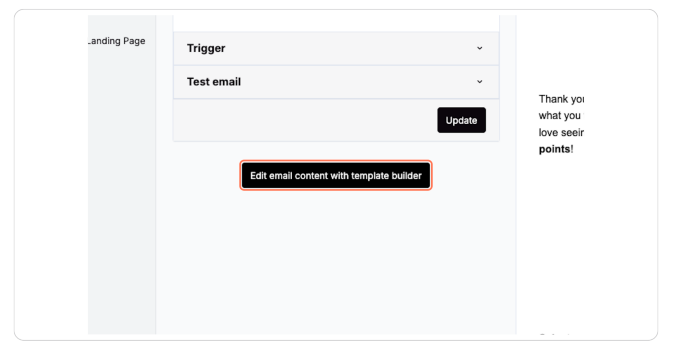
Step 5: Select the Review Request Block
Inside the editor, click directly on the Review Request block (the section that contains the star rating).
You must select this block to access rating options and additional questions.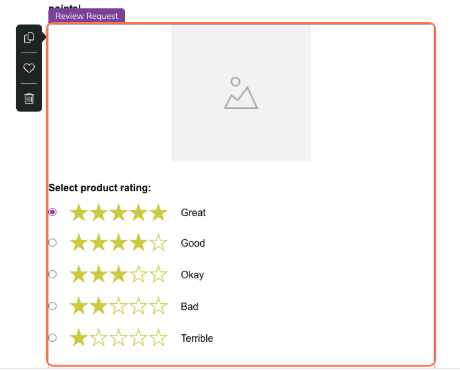
Step 6: Configure Product Ratings
With the Review Request block selected, click Select product rating and configure the available rating options (Great, Good, Okay, Bad, Terrible).
Step 7: Add Additional Questions (Optional)
Still within the Review Request block settings:
Expand Additional questions
Click Add
Choose or configure the question (for example, “Would you recommend this product?”)
These questions appear to customers after they select a rating.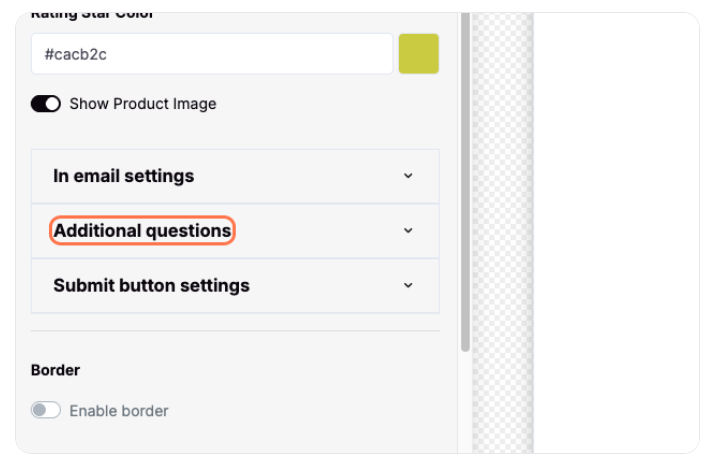
Step 8: Save Changes
Wait for the confirmation message “Changes have been saved.”
Step 9: Close and Finish
Click Close Editor
Click Finish
Click OK to confirm
Your updated Product Review Request email is now live.
Troubleshooting
I don’t see “Additional questions”
Make sure you have clicked the Review Request block inside the email editor
Additional questions will not appear unless that block is selected
Was this article helpful?
That’s Great!
Thank you for your feedback
Sorry! We couldn't be helpful
Thank you for your feedback
Feedback sent
We appreciate your effort and will try to fix the article